Disclosure: As a member of the Amazon Associates program, we earn from qualifying purchases. Some links in this guide are affiliate links. We may get paid if you buy something or take an action after clicking one of these links, at no additional cost to you. It’s how we fund the work that it takes for us to create and maintain these guides.
Gone are the days of long-distance calling cards and hair-raising phone bills. Today, all you need to call your friends and family across the world – or even in your town – is a smart device and some internet data. WiFi calling is virtually the cheapest way to stay in touch, as you don’t pay any money save for your monthly internet bill.
There’s nothing more annoying, however, than a dwindling WiFi connection when you’re talking to someone from your smartphone. You’re trying to catch up with your buddy in Berlin, and their voice keeps trailing off – and not just because they spotted something more interesting than you from their balcony. Rather, your router lacks the necessary features to provide you with a smooth, lag-free WiFi call.
To help you avoid this irritating scenario, we’re going to go over what WiFi calling is, what its perks are, and most important of all – how you can choose the best router for WiFi calling, which will allow you to actually talk to people rather than curse intermittently into your phone.
WiFi calling is an HD (high definition) voice calling service which utilizes a high-speed internet connection so you can make and receive calls through wireless. If you have a good ISP (internet service provider) and a high-speed internet data package, you’ll need to pair it with a good router to get the best quality WiFi call.
Generally, you would use a smartphone for WiFi calling. While some older smartphones support up to the 802.11n wireless network standard, a lot of newer smartphone models, like Galaxy Note 10 or iPhone 6, also support
WiFi calling is the cheapest solution for high-quality calls
WiFi calling allows smartphones to text and call others through a wireless network instead of a regular cellular network. While you may think that WiFi calling is the same as using Skype, there are actually several differences. For instance, rather than calling people based on usernames, WiFi calling uses the actual mobile phone numbers for calls. This is because it isn’t another program – it simply replaces the cellular network with a wireless network to place calls.
What are the Benefits of WiFi Calling?
Some of the benefits of WiFi calling are:
It’s the cheapest form of international calls;
Allows travelers to text or call home without paying roaming charges – you’d just need an internet connection;
Provides your phone with a signal where the cellular network won’t reach, like basements or ground floor apartments;
You get to use existing cell phone numbers to call.
What Do I Need for WiFi Calling?
The first step is having a phone that supports WiFi calling – which a lot of recent smartphone models do (and most Android already have this feature). Then, in order to use WiFi calling, you need to activate this feature in the device settings.
Make sure that your carrier supports WiFi calling. Most major cell phone carriers in the US and Canada already support WiFi calling, including T-Mobile, Verizon, AT&T and Sprint in the US, and Roger, Bell, Telus, and Freedom in Canada.
But these are the minimum requirements of having a good WiFi call. High internet speed, WiFi call-supporting carrier, and a smartphone that supports 802.11ac wireless all mean nothing if you don’t have a good router. So how can you choose the best router for WiFi calling?
How To Choose the Best Router for WiFi Calling
Let’s look at the main factors you should consider when purchasing the best router for seamless and lag-free WiFi calls.
Make Sure Your New Router Supports 802.11ac Wireless
Although WiFi 6, or 802.11ax is still in the early market stages, most modern wireless routers already support the 802.11ac wireless network standard. When choosing a good router for WiFi calling, opt for a router that has this feature.
Older router models, that support only 802.11n and earlier wireless network versions, will be unable to provide you with the necessary speed and data transfer rate (in terms of Mbps) for a high-quality call experience.
Look for Intelligent QoS with Traffic Prioritization
Routers that feature intelligent QoS (quality of service) can help you automatically prioritize the internet traffic for WiFi calling. This means that no matter how many devices are connected to your router, and engaging in data-heavy online activities like gaming, streaming, or downloading, your voice call won’t suffer the consequences.
In other words, traffic prioritization makes sure that WiFi calls get priority when it comes to sharing the bandwidth with other devices. This will significantly decrease the chances of choppy conversations or lags.
Go for a Router with a Beamforming Feature
Beamforming technology on routers focuses the wireless signal of the two bands (2.4GHz and 5GHz) directly to the connected devices, rather than broadcasting it in all directions.
This sort of a focused wireless signal will improve the quality of your WiFi call. Smartphones usually use the 2.4GHz band, but the 2.4GHz frequency is most commonly prone to interference, as devices such as microwaves and baby monitors also operate on this frequency.
However, beamforming will ensure that the signal is concentrated on your device, thus reducing the effects of interference.
Make Sure Your Router has Sufficient Area Coverage
Most modern routers come with multiple antennas for better wireless range. Make sure your new router has sufficient area coverage that matches the size of your home.
Let’s say you want to make a WiFi call from your room, for instance, but your room is far from the router. If your router has a low signal strength, you’ll experience a dwindling connection regardless of the router’s other features.
Domain Name Sanity is a participant in the Amazon Services LLC Associates Program, an affiliate advertising program designed to provide a means for sites to earn advertising fees by advertising and linking to Amazon.com. As an Amazon Associate we earn from qualifying purchases. Amazon and the Amazon logo are trademarks of Amazon.com, Inc. or its affiliates.
Last updated on June 18, 2026. Pricing Information and Product Images obtained from Amazon Product Advertising API.
Let’s take an in-depth look at these two days in November that are entirely dedicated to consumerism. After all, they’re the biggest spending holidays we have until Christmas! (Or rather, the biggest spending holidays inspired by Christmas.)
Every small business needs to have a reliable and smooth internet connection. Whether you’re running a small bookshop, a cafe, or an accounting agency, you’ll need a secure network and a fast internet connection that has the capacity to support multiple users – including employees, clients, and guests.
Believe it or not, not all routers are compatible with all internet service providers (ISPs). Depending on the type of internet you’re getting – cable or fiber-optic, for instance – you’ll need to look for different router options. Find the right one for you with our guide.
Best WiFi Router For Google Fiber
By Douglas Moore
April 22, 2020
Disclosure: As a member of the Amazon Associates program, we earn from qualifying purchases. Some links in this guide are affiliate links. We may get paid if you buy something or take an action after clicking one of these links, at no additional cost to you. It’s how we fund the work that it takes for us to create and maintain these guides.
Google is one of the leading tech companies in the world. In addition to running the world’s most popular and widely used search engine, they’ve been active in developing innovative apps and devices with the latest technology.
One such advancement is Google Fiber, which is a broadband internet service with an impressively high speed of 1,000Mbps. If you’ve decided you want in on the Google Fiber high-speed internet action, you also need to pick a wireless router that will do it justice. Because when we’re talking about 1,000Mbps of high-speed internet, not just any old router will do.
To help you out, we’ll go over what Google Fiber is and how you can choose the best WiFi router for Google Fiber.
Google Fiber offers high-speed internet of 1,000Mbps. Considering that most intense online activities, such as streaming in HD or gaming, can generally run quite smoothly on 20-25Mbps, Google Fiber is bringing speed to a new level.
Google Fiber offers high-speed broadband internet
If you’re a hard-core gamer or have a lot of devices hooked to your home wireless network, Google Fiber can be a real game-changer in your household.
How To Choose the Best WiFi Router For Google Fiber
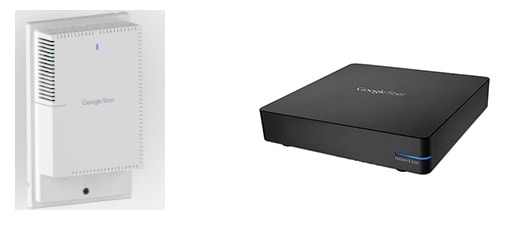
When you get Google Fiber, it comes with two additional devices – a Fiber Jack, which serves as a kind of modem, and a Network Box, which serves as a router. However, the Network Box has some limitations – such as limited area coverage and limited customizable settings – which may lead you to opt for adding another router to your home network. When you add a powerful router, you can use the Network Box as an access point and get the most out of your internet connection.
Using Google Fiber means opting for an ISP that offers a high-speed, reliable, and low-latency internet. But to get the most out of Google Fiber, you need to choose a router that boasts the necessary features for an optimized Google Fiber experience. This means a router that supports a maximum speed of 1,000Mbps, to begin with.
Additionally, you’ll need to choose a router that supports the latest wireless network standards (WiFi 5, i.e. 802.11ac, or even WiFi 6, i.e. 802.11ax), that has a high-speed, dual-core processor, comes with decent signal strength, and offers features that will ensure a strong, lag-free connection.
So, how do you choose the best WiFi router for Google Fiber? Let’s take an in-depth look at the most important factors you should consider when choosing the best WiFi router for the optimal Google Fiber experience.
Choose a Router that Can Support the Google Fiber Internet Speed
One of the main things that Google Fiber brings to the table is high internet speed. Consequently, the main thing you want from your new router is that it can support that internet speed.
This means finding a router that can support 1,000Mbps of internet data transfer. In addition to checking the specs, there’s another way to get an idea of the speed that a router offers.
Namely, when you look at most router models, generally next to the brand name you see a specification like AC750 or AC5000. In the case of the former, it means that the router can support a maximum internet speed of 750Mbps, and in the case of the latter, 5,000Mbps. However, this number stands for the total amount of internet speed spread between the bands.
So a dual-band router with a total speed of 750Mbps will offer roughly 200Mbps for the 2.4GHz band, and about 550Mbps speed for the 5GHz band. Clearly, neither will be able to channel that high-speed Google Fiber internet. Overall, we don’t recommend models that have a maximum total of 750, 900, or even 1,200Mbps.
A tri-band router with a total internet speed of 5,000Mbps would divide the speed between one 2.4GHz router with a speed of about 1,000Mbps, and two 5GHz bands with a maximum speed of 2,166Mbps. This would be a much better option if you’re using Google Fiber internet.
Basically – just make sure your new router has the necessary capacity to run on 1,000Mbps.
Don’t Buy Old Router Models
While different versions of Google’s Network Box support varying wireless network standards, you should make sure that your router supports the latest and most used wireless network standards – 802.11ac and 802.11n. Older router models that only support earlier network standards won’t be able to provide a proper internet connection to your smart devices, and they certainly won’t be able to go up to the incredible 1,000Mbps internet speed.
Additional Features To Look Out For
To make sure your internet connection is smooth, fast, and lag-free, you should look for the following features in a router model:
MU-MIMO (multi-user multiple input multiple output) technology: routers with MU-MIMO features allow for simultaneous HD streaming from multiple devices without lags or interferences.
Beamforming technology:beamforming concentrates the signal frequency directly to connected devices, so the bands don’t broadcast in all directions, which can cause network interferences from other devices (like microwaves or baby monitors).
Intelligent QoS with traffic prioritization: allows you to prioritize internet traffic for certain devices or activities. This is important for gamers – to get the best out of that 1,000Mbps of internet speed, you’ll want to choose a router that can devote the lion’s share of the bandwidth to your gaming PC or console.
Multiple antennas: choosing a router with multiple antennas will help you ensure you have a strong wireless signal in every corner of your home, and eliminate dead zones.
Domain Name Sanity is a participant in the Amazon Services LLC Associates Program, an affiliate advertising program designed to provide a means for sites to earn advertising fees by advertising and linking to Amazon.com. As an Amazon Associate we earn from qualifying purchases. Amazon and the Amazon logo are trademarks of Amazon.com, Inc. or its affiliates.
Last updated on June 18, 2026. Pricing Information and Product Images obtained from Amazon Product Advertising API.
When you’re a gamer, a fast and reliable internet connection is of the essence. Most gamers prefer a hard-wired connection over a wireless connection for precisely this reason: reliability and speed. The best Ethernet cables for gaming will allow you to use the optimal internet speed provided by your ISP.
Let’s take an in-depth look at these two days in November that are entirely dedicated to consumerism. After all, they’re the biggest spending holidays we have until Christmas! (Or rather, the biggest spending holidays inspired by Christmas.)
Whether you’re an avid gamer, need high-speed internet for work, or simply have a full house that’s in dire need of reliable, fast internet for your home entertainment units, you’re one of many on the search for the Holy Grail of fast internet.
How Do Dual-Band Routers Work?
By Douglas Moore
April 22, 2020
Disclosure: As a member of the Amazon Associates program, we earn from qualifying purchases. Some links in this guide are affiliate links. We may get paid if you buy something or take an action after clicking one of these links, at no additional cost to you. It’s how we fund the work that it takes for us to create and maintain these guides.
Wireless routers are a must-have in most homes and offices. Once you connect them to a modem, routers work to provide all the smart devices in your area network with a wireless internet connection.
Generally, there are three types of routers: single-band, dual-band, and tri-band. Dual-band routers are most commonly used today. In fact, starting with the two latest wireless standards, 802.11n and 802.11ac, most modern routers began acting as dual-band routers.
But how do dual-band routers work? What does it mean for a router to be dual-band? And how does the number of bands change your internet experience? We’re here to answer these questions, and give you an overview of everything you need to know about dual-band routers.
There are two standard frequency channels that smart devices use to connect to the internet: 2.4GHz and 5GHz. Single-band routers only support the 2.4GHz frequency, dual-band routers support one 2.4GHz and one 5GHz frequencies, and tri-band routers have one 2.4GHz frequency and two 5GHz frequencies.
Dual-band routers support one 2.4GHz and one 5GHz frequency channels
Dual-band routers are the most widely used router type today, as they are affordable and provide you with two separate wireless interfaces. This allows for a good deal of flexibility in the number of devices you connect to the internet and the kind of tasks you use them for – be it browsing, gaming, or streaming.
So, why is it important that a dual-band router contains two frequencies? The answer is that each frequency, i.e. the 2.4GHz and 5GHz channels, have different benefits and uses. Some devices and tasks require a 2.4GHz frequency, and others require the larger bandwidth and speed that comes with the 5GHz channel. In the next section, we will go over what each frequency has to offer in more detail.
One of the main benefits of the fact that dual-band routers support two frequencies is that they allow for multiple users and devices to use wireless internet simultaneously without sacrificing speed or quality. In fact, most dual-band routers incorporate MU-MIMO technology (multi-user multiple input multiple output). This means that multiple users can stream from their devices – or undertake other high-bandwidth tasks – at the same time without lags and disconnects.
The Different Advantages of 2.4GHz and 5GHz
Let’s take a look at when each of these channels is used and what their individual benefits are.
Interference
When you have multiple devices hooked up to your Wi-Fi, you may worry that the traffic would cause congestion. This is often the case with single-band routers that only support the 2.4GHz frequency. However, dual-band routers help to avoid this issue thanks to its second frequency.
To begin with, the 2.4 GHz band is used by a lot more devices when you do light work on the internet, such as browsing. Smartphones, for instance, most commonly use the 2.4GHz band.
An additional issue, however, is that home gadgets, such as microwaves, Bluetooth devices, garage door openers, and even baby monitors use the 2.4GHz frequency, too! This means that the 2.4GHz band is quite prone to interference when these other devices are used, as it supports only three non-overlapping channels.
The 5GHz band, on the other hand, supports 23 non-overlapping channels. The 5GHz frequency is thus much less congested and has significantly lower chances of interference. The great thing about a dual-band router is that it divides the labor between the channels based on the device, usage, and its proximity to the router.
Range and Speed
Don’t be too fast to overlook the 2.4GHz frequency, however. The reason it is so congested is that it has a far better range than the 5GHz frequency. The 2.4GHz band reaches much further than the 5GHz band. Plus, 2.4GHz signals can penetrate solid objects, like walls, a lot better than 5GHz. If you are using a router in a home or office with multiple rooms, you’ll find the 2.4GHz brand quite useful.
On the other hand, the 5GHz band offers superior performance in the form of smoother connection and faster internet speed. So if you’re using a gaming PC or console and need a lag-free connection, using the 5GHz band is a far better choice. However, you and your device would need to be close to the router, as the 5GHz band doesn’t penetrate walls very well.
Usage Based on Device and Application Types
Overall, the 2.4GHz band is preferred for low-bandwidth activities, such as browsing the internet, writing emails, and most smartphone apps.
The 5GHz band is recommended for gaming, streaming in HD, and heavy file transfers or downloads.
You may want to make sure your new dual-band router comes with intelligent QoS (quality of service) which automatically assigns the appropriate band based on the type of device and type of activity.
Spreading out the usage of these bands across multiple devices will allow you to efficiently share the bandwidth and optimize your online experience.
A Few Words Before You Go…
Hopefully, we’ve given you a better idea of how dual-band routers work. To quickly recap:
Dual-band routers are well-suited for large homes or offices with multiple users and devices.
The 2.4GHz frequency ensures a very broad range, so that users can connect to the internet from any room of your local area network.
While the 2.4 GHz frequency has more internet traffic and less channels, and is thus more prone to congestion, the 5GHz frequency has 23 non-overlapping channels which decrease the chances of interference.
The 5GHz frequency offers less network interference, and a smoother, faster internet speed – as long as your device is placed near the router.
The 2.4GHz frequency is best used for low-bandwidth internet use, such as browsing or light streaming, while the 5GHz frequency is ideal for gaming, HD streaming, and downloads.
Domain Name Sanity is a participant in the Amazon Services LLC Associates Program, an affiliate advertising program designed to provide a means for sites to earn advertising fees by advertising and linking to Amazon.com. As an Amazon Associate we earn from qualifying purchases. Amazon and the Amazon logo are trademarks of Amazon.com, Inc. or its affiliates.
Last updated on June 18, 2026. Pricing Information and Product Images obtained from Amazon Product Advertising API.
Whether you’re an avid gamer, need high-speed internet for work, or simply have a full house that’s in dire need of reliable, fast internet for your home entertainment units, you’re one of many on the search for the Holy Grail of fast internet.
To help you find the best gaming router, we’ve compiled our list of favorites. Our top picks ensure a smooth, multiple antennae-backed connection, prioritized gaming features to minimize lag, and come with multiple LAN and Ethernet ports.
There’s no better way to digitize your precious photos than by using a photo scanner. In today’s day and age, a secure way to ensure that old photo albums, slides, and film negatives stay in our lives, and within arm’s reach, is using a great photo scanner to bring these photos to our smart devices and storage clouds. Additionally, scanners can be used to digitize original documents, so we always have a backup copy handy.
What Wi-Fi Router Do I Need?
By Douglas Moore
April 22, 2020
Disclosure: As a member of the Amazon Associates program, we earn from qualifying purchases. Some links in this guide are affiliate links. We may get paid if you buy something or take an action after clicking one of these links, at no additional cost to you. It’s how we fund the work that it takes for us to create and maintain these guides.
You have chosen an ISP (internet service provider) and gotten yourself a modem. Your home has internet now! However, to make that Internet connection wireless and available to multiple smart devices, you need to get a Wi-Fi router.
A modem is your bridge to the internet via cable, fiber optic, or a phone line. However, a modem only provides a wired internet connection to one or more devices (depending on the number of LAN ports), or a wireless connection for a single device. But once you hook up a Wi-Fi router to your modem, it creates a network among the smart devices in your home and connects them to the modem’s network, i.e. the internet.
The modem provides internet to your router, which makes it available to multiple devices in your home.
However, choosing a Wi-Fi router can be a daunting task. There’s a lot of technical wording that surrounds router models, which may get a bit confusing. To help you out, we’ve written a comprehensive guide that goes through the factors you should consider when choosing the best Wi-Fi router for your unique needs!
Let’s look at the basics of what you should look out for when choosing a router tailored to your needs.
Determine Your Internet’s Top Speed
When you buy an internet package from your ISP, it comes with a certain top speed. To give you a general idea, decent and average internet speed is considered to be 25 Mbps and above. This speed is sufficient for most online activity, including browsing, gaming, streaming, downloading, and so on. However, if you want fast internet that’s capable of supporting intense internet activity for multiple users and devices, there are fast internet packages that range from 100 Mbps all the way to 5,000 Mbps.
Now, let’s return to how this affects which Wi-Fi router you buy. Different routers offer the ability to support varying internet top speeds. So let’s say there’s a router that offers a 5,000 Mbps top speed. However, if your internet package provides only 25 Mbps, this router isn’t magically going to make your internet faster.
The opposite is also true. If your internet package comes with a top speed of 5,000 Mbps, but your router can only support a maximum top speed of 1,200 Mbps, you won’t be able to get internet as fast as 5,000 Mbps.
Picking a Router with the Right Wi-Fi Standard
Wireless internet has been evolving since its beginnings in 1999 with Wi-Fi 802.11a. You can recognize which Wi-Fi standard a router uses based on the letter that follows the numeric value: a, b, g, n or ac.
The most commonly used Wi-Fi global standards today are 2009’s 802.11n and 2014’s 802.11ac. Naturally, you’d want to get a router that supports one of the latest Wi-Fi standards, as the technology of earlier models is now considered obsolete, and the internet speed they provide is significantly slower.
Even though N-version routers are still being used, we’d definitely recommend choosing an AC-version router. Technology is moving forward, and the N-versions will become obsolete faster than the AC-versions. Plus, their prices aren’t all that different!
Figure Out How Much Speed You’re Really Getting
Router models come with classifications that indicate the top speed they offer. Usually, next to the router’s brand name, you’d get something like AC1200 or AC5000. This indicates that the router uses 802.11ac Wi-Fi standard, and has a combined speed of 1,200 or 5,000 Mbps, respectively.
In other words, the number doesn’t represent the top speed you can reach with any connected device. The number is actually a combination of the speeds from the two – or three – bands that comprise your wireless router. For instance, in the case of an AC5000 tri-band type router, the 5000 value is divided between three frequencies, one 2.4GHz band and two 5GHz bands. The 2.3GHz band is hitting 600 Mbps, and the two 5GHz bands are hitting 2166 Mbps. As every device can only be connected to a single band at a given time, there’s no way that you could be using up the maximum combined speed of 5,000 Mbps.
Overall, we strongly advise against getting a router model below 1,200 Mbps, or AC1200. Routers with smaller values, like AC750 or AC900, are outdated and will fail to provide a fast and reliable connection for multiple devices in your home.
Dual-Band Or Tri-Band?
Most modern routers come with at least a dual-band connection. A single-band router will only come with the 2.4GHz frequency, which can get quite crowded when used by multiple devices. The 2.4GHz frequency is generally only used for smart devices that use cheaper WiFi chipsets.
In addition to a 2.4GHz frequency, a dual-band router also comes with a 5GHz radio frequency, which is a better choice for gaming, streaming, and all modern devices. A tri-band router includes a second 5GHz frequency. When you have two 5GHz frequencies, you can use your router’s intelligent QoS (Quality of Service) to dedicate one of them to streaming, downloading, or file transfers, and the other one to your gaming PC or console – if you’re a gamer – to ensure that you won’t experience any lag.
While a dual-band router is quite sufficient for most homes, if you have multiple users in your household that use a good deal of bandwidth, you may choose to opt for a tri-band option.
Additional Features
If you have multiple devices and users in your home, you should opt for a model that offers MU-MIMO (multi-user multiple-input and multiple-output) technology.
This enables seamless multiple streaming from multiple devices (or users), without lags and slower speeds. Another feature that most modern routers include is beamforming, which focuses the wireless signal only to the areas where the connected devices are, rather than spreading the broadcast in all directions, especially important if you need your WiFi signal to cover a long range from the router.
If you’re gaming or need a bigger share of the bandwidth than other members in your household, you should look for a router that offers intelligent QoS. This will allow you to prioritize devices that undertake certain functions, like gaming.
Domain Name Sanity is a participant in the Amazon Services LLC Associates Program, an affiliate advertising program designed to provide a means for sites to earn advertising fees by advertising and linking to Amazon.com. As an Amazon Associate we earn from qualifying purchases. Amazon and the Amazon logo are trademarks of Amazon.com, Inc. or its affiliates.
Last updated on June 18, 2026. Pricing Information and Product Images obtained from Amazon Product Advertising API.
Homes and offices with multiple users and devices need strong security. Unfortunately, every device is a sort of a liability to your network, as cyber threats loom over even the most experienced of users. To ensure that your network is foolproof and safe, you’d need a combination of security tools: a software firewall, a router, and a hardware firewall.
You can’t be expected to play at your best when you’re not at your most comfortable. And it’s not like you need to spend an arm and a leg to get the proper treatment that you and your gaming equipment deserve. What we mean is, you need a gaming desk, and the best gaming desks are both comfortable and affordable!
To help you find the best gaming router, we’ve compiled our list of favorites. Our top picks ensure a smooth, multiple antennae-backed connection, prioritized gaming features to minimize lag, and come with multiple LAN and Ethernet ports.
Best WiFi Router for Long Range: Reviews of Our Top Picks for 2020
By Douglas Moore
April 20, 2020
Disclosure: As a member of the Amazon Associates program, we earn from qualifying purchases. Some links in this guide are affiliate links. We may get paid if you buy something or take an action after clicking one of these links, at no additional cost to you. It’s how we fund the work that it takes for us to create and maintain these guides.
A WiFi router is the staple of most modern homes. It allows you to form a network of your local devices and connect them to the internet. The best wireless routers will allow multiple users and devices to simultaneously stream, work, or game online seamlessly, without interruptions or lags.
When you live or work in a large space, however, finding a router with a powerful wireless coverage is a bit challenging. A lot of regular routers have trouble reaching every room in your home, and thus leave wireless dead zones – which are quite the nuisance. Plus, if they don’t support beamforming, their band frequencies will have trouble penetrating solid objects like walls, leaving your room with a flaky connection.
But that’s what we’re here to remedy. We’ve scoured the market and come up with the best WiFi routers for long-range, so that no corner of your home is left internet-less. Our list includes single routers, mesh system, and WiFi extenders, so that you can find the best option for your home. Each recommendation has a different area coverage and a different price – so there’s something here for every size home and every type of budget.
Our top picks have a strong, powerful signal and offer high-speed internet. Some recommendations even support WiFi 6! Regardless of what the distance is between the router and your room, whether you live in a large apartment, multi-story house, or a big residence, you’ll find the right router with a sufficiently extended range right here. Plus, all our recommendations support multiple users and multiple devices for seamless work and streaming online.
Without further ado, here are our favorite WiFi routers that offer the best wireless range!
Features: offers 5,000 square feet wireless area coverage, supports WiFi 6, features MU-MIMO and OFDMA technology for multiple-device streaming, good security.
Features: offers 3,500 square feet wireless area coverage, features beamforming for focused bands and MU-MIMO for streaming, can support up to 55 devices.
Features: offers additional 1,200 square feet wireless area coverage, can be used as part of mesh system with TP-Link Archer A7, compatible with Alexa.
Our overall favorite WiFi router for long-range is the Asus RT-AX88U. This dual-band router provides high wireless internet speed, supports the WiFi 6 (802.11ax) network standard, and has a broad area coverage of up to 5,000 square feet – which is pretty impressive for a single device. It also supports multiple device streaming and comes with a lot of useful security features.
Pros:
The RT-AX88U has one of the best long-range coverages on the market. While you can pair it with a mesh system for broader coverage, this router alone can cover areas of 3,000 – 5,000 square feet, which is no small feat.
This router is a great choice for internet users chasing the highest speed internet available, as it supports the latest wireless network standard, WiFi 6, or 802.11ax. This next-generation WiFi is great for increasing the efficiency of a network for a multi-person household. Plus, the router comes with a total speed of 6,000 Mbps, which gets divided up between the two bands (one 2.4GHz band and one 5GHz band).
Keep in mind that even though it’s a WiFi 6 router, it also supports older devices running on previous and current WiFi standards – 802.11a/b/g/n/ac.
The Asus RT-AX88U has all the features you need for internet use and streaming by multiple devices simultaneously. The 4 antennas and 8 LAN ports are just the beginning – this router comes with a combination of OFDMA (orthogonal frequency division multiple access) and MU-MIMO (multi-user multiple-input multiple-output) technology which provides up to four times higher network capacity and optimizes bandwidth distribution in traffic-dense networks. In other words, no matter how many people are connected to the wireless, they’ll be able to enjoy seamless streaming.
Last but not least, this Asus router offers excellent commercial-grade security. The featured AiProtection adds an additional layer of protection between potentially harmful malware and your connected devices by blocking internet security threats.
Cons:
As the WiFi 6 wireless network standard is still quite new, the RT-AX88U may need a few firmware updates for best performance.
Another drawback is that Asus isn’t exactly known for good customer support.
The NETGEAR Nighthawk X6S is our top choice for a multi-story house, as its three bands, 3,500 square feet coverage, and beamforming feature will make sure there’s no dead corners left in your home. This tri-band router is a great choice for households with lots of devices, as it can support up to 55 smart devices simultaneously.
Pros:
The Nighthawk X6S comes with a slightly lower Mbps internet speed than the Asus RT-AX88U, with a total of 4,000Mbps divided between the three bands (750Mbps for the 2.4GHz band, and 1,625 for each 5GHz band). Still, this is quite fast as devices rarely reach or even need the theoretically highest speed available. Plus, the two 5GHz bands will allow you to distribute traffic efficiently, or even devote one entire band to a single device that needs more bandwidth.
This router is the ideal choice for households with many members, and thus many smart devices. It can support up to 55 simultaneously connected devices and provide them with smooth 4K streaming and even multi-player gaming. The Nighthawk X6S features MU-MIMO technology for streaming from multiple devices, as well as beamforming. Beamforming works by focusing the band frequencies directly to devices, rather than spreading it in all directions. This allows for a smoother network connection with less interference
The six amplified antennas provide internet in spaces up to 3,500 square feet. The broad coverage paired with the beamforming feature makes the Nighthawk a great choice for multi-story houses.
This model also features four ethernet ports for hardwired gaming and USB ports which allow you to share a storage drive or printer with any connected device. Plus, you can create a personal cloud storage that will be available to the devices in your network.
In terms of security, the Nighthawk supports WPA2 wireless security protocols and also features a Guest WiFi access and a firewall, providing you with an additional layer of security.
If you have kids, you can purchase the Smart Parental Controls app for an additional $5, which allows you to filter websites, set online time limits, schedule device internet access, and so on. In a nutshell, it will give you more control over your child’s online activities.
Lastly, this router is really easy to set up with the featured user-friendly app.
Cons:
One issue with this router is that while it says in the description that it supports VPN, it actually only supports Windows VPN. So if you want to run a VPN off it, you’ll need to download a third-party firmware update.
The AmpliFi HD WiFi System offers the broadest area coverage out of all our recommendations since it’s not just a router – it’s a mesh system. The kit comes with a Wi-Fi router and two MeshPoints (WiFi extenders) to maximize the range of wireless coverage. In total, the AmpliFi system covers areas of up to 10,000 square feet – the longest range of all our recommendations. If you have a huge house or office, go for this system. Keep in mind though, it’s also the priciest option on our list.
Pros:
The AmpliFi HD WiFi system is the best way to ensure there are no dead zones in large houses. In addition to the router, you can place the two MeshPoints in different areas to increase the wireless coverage consistently throughout your home. The smooth wireless connection is suitable for 4K streaming, gaming, downloading, and video chatting without lags. The router also features four ethernet ports for a stable, hardwired internet connection.
The AmpliFi router comes with super antennas that beam wireless signals to multiple smart devices to any part of your home. If you have a smart home, or multiple smart devices, the broad coverage can help you connect them into a single network. For instance, even if your smart security system and smart TV are at the opposite ends of your home, they can still get a strong wireless signal and be a part of the same network.
Although you may be initially intimidated by the multiple devices, the AmpliFi Mesh system is actually really easy to set up. You just need to use the user-friendly AmpliFi app, distribute the MeshPoints, and your wireless will up and running in no time. The app comes with a lot of useful controls features that allow you to customize your network, from home or away – as it also features remote access. You’ll be able to create family profiles, manage parental controls, and adjust guest access, as well as schedule internet access.
This option also features the most elegant look of all our recommended products. The simple white design with soft curves will blend into your home without causing an eye sore. Plus, instead of the blinking lights that you usually get with routers, the AmpliFi comes with a touchscreen display, which will give you a better overview of what’s going on with your internet connection.
The AmpliFi also features a built-in firewall, so it will decrease the risk of online security threats.
Cons:
This is the most expensive recommendation on our list – so it won’t be very easy on your budget.
Another drawback is that connecting to the mesh points rather than the router may somewhat decrease your internet speed.
The Asus RT-AC86U is our top recommendation for a long-range gaming router (side note: we have a full article on the best gaming router here). This dual-band router combines useful gaming features, like traffic prioritization, with a broad area coverage of around 5,000 square feet. This router also offers great value for the money, as it’s a more affordable option than most of our picks, but comes with reliable performance and fast internet.
Pros:
First things first – why is the Asus RT-AC86U great for gaming? To begin with, it features Adaptive QoS (quality of service) which prioritize gaming packets. This means that you can adjust the settings to prioritize the traffic on your gaming PC or console, and get the lion’s share of the bandwidth.
Additionally, this router features WTFast game Accelerator which further decreases the chances that you’ll experience any lag when gaming. And if you want a hardwired connection for gaming, you’ll be happy to know that the router comes with four Gigabit Lan ports.
The RT-AC86U provides you with a maximum internet speed of 2,900Mbps shared between the two bands. As the 2.4GHz band rarely goes above 750Mbps, your 5GHz band will always have plenty of gaming speed. In any case, the maximum speed offered by this router is great for gaming, streaming in 4K UHD, downloads, and work online. This router features one of the fastest speeds you can get for the price.
In addition to long-range WiFi coverage, the RT-AC86U can also support multiple devices, so it’s a great choice for multi-person households. It features MU-MIMO technology which will make sure that every connected device gets full-speed wireless internet, even during simultaneous streaming or gaming.
If you are using a VPN or would like to use a VPN, you’ll like the Asus RT-AC86U. It comes with built-in firmware support for VPN client mode. Plus, the router comes with a Trendy Micro built-in security which will protect you from potential online attacks.
Last but not least, installing this router and adjusting its network settings is easy thanks to the ASUSWRT app. After a simple 3-step web-based installation, you’ll have access to multiple settings which give you full control of your home network. You’ll be able to assign traffic prioritization, manage data usage, adjust parental controls, and get notifications about security, firmware updates, and changes in your network.
Cons:
The design of this router is slightly limiting, as you can only mount it vertically.
Who says that you have to spend hundreds to get a proper long-range router? The TP-Link Archer A7 is here to prove otherwise. While this router has a smaller area coverage than some other models, it can still provide a reliable and fast internet connection in areas of up to 2,500 square feet. Plus, this router comes with lots of useful features and can support up to 50 smart devices at a time! Not to mention that it’s won the JD Power Award for highest customer satisfaction in 2017 and 2019.
Pros:
This dual-band router is ideal for 4K streaming as it has features to reduce buffering. It comes with a maximum 1,750Mbps of internet speed, divided between the 2.4GHz band (450Mbps) and the 5GHz band (1,300Mbps). The 3 external antennas provide long-range WiFi, so you can stream seamlessly from any corner of your home.
This router is also a great choice for gamers. It features intelligent QoS which you can use to assign bandwidth prioritization to your gaming PC or console. Plus, the Archer A7 comes with 4 Gigabit LAN ports for a reliable hardwired connection for gaming.
The Archer A7 can support as many devices as its pricier counterparts. Thanks to its powerful CPU for high-speed processing, you can connect about 50 devices to the router and still expect a reliable WiFi performance.
Some additional features of this model is that it’s compatible with Alexa and supports WiFi 5, i.e. 802.11ac, and all older wireless network standard devices.
You’ll love how easy it is to set up the Archer A7. You just need to install the TP-Link tether app and follow a simple process. You can use this app to control the network settings, like traffic prioritization, remotely as well.
Cons:
When you install firmware updates, you’ll lose all previous settings and password – so make sure you backup your settings before any firmware updates.
Another possible drawback of the Archer A7 is that you can’t disable WPS, which may be a bit of a security risk.
If you already have a router that you’re happy with, and you just need something affordable that will allow you to extend its wireless range, you can opt for TP-Link’s AC750 WiFi extender. This is a great budget-friendly option for those who already have a decent router at hand. The TP-Link WiFi extender can increase your WiFi area coverage an additional 1,200 square feet. It’s compatible with any sort of router, gateway, or access point.
Pros:
This extender comes with two bands – a 300Mbps 2.4GHz band and a 433Mbps 5GHz band. While it’s lower than the speed offered by most routers, it’s sufficient for media streaming, light gaming, browsing, and so on.
The TP-Link extender increases the area coverage by 1,200 square feet and can support up to 20 devices. This is quite sufficient as it will cover the WiFi dead zones of your home, where you probably won’t be using more than 20 devices anyway. It also supports hardwired devices as it has a single Fast Ethernet port.
The TP-Link WiFi extender can also be used as a part of a Mesh network, but it’s only compatible with the Archer A7 wireless router – our previous recommendation. In fact, pairing these two can get you a wireless area coverage of 4,000 square feet for less than $100! Meanwhile, TP-Link intends to update the extender to work with various different routers.
Setting up this WiFi extender is also quite easy, as it comes with a smart indicator light which will help you set it up in the best location for optimal wireless coverage in your home.
Lastly, this extender works with Alexa.
Cons:
The router’s firmware doesn’t update automatically, so you’ll need to occasionally check the TP-Link website for patches, and install them yourself.
Our overall best pick is the Asus RT-AX88U for its high internet speed and long-range wireless coverage of 5,000 square feet. This router also supports WiFi 6, so if you’re an internet speed junkie, you’ll love the RT-AX88U. It’s also good for gaming, multiple-device streaming, and offers good security.
If you live in a multi-story house, your best bet is the NETGEAR Nighthawk X6S. Although it has a smaller area coverage than the Asus (3,500 square feet), the featured beamforming will allow the router to target its frequencies to your smart devices, rather than broadcasting them all over. It can support up to 55 devices, and features MU-MIMO for multi-device simultaneous streaming.
Our favorite pick for best WiFi router mesh system is the AmpliFi HD WiFi System. As a system that includes one router and two mesh points, the AmpliFi offers the broadest area coverage of any recommendation – 10,000 square feet. This is the best choice for the largest offices or houses. Your wireless will reach the backyard without a problem. It’s great for 4K streaming, smart homes, and has an elegant design.
The Asus RT-AC86U is the best gaming router for a large home. Like the Asus RT-AX88U, it has a 5,000 square feet wireless coverage. It’s great for gaming as it has intelligent QoS for traffic prioritization for gaming, and comes with a WTFast game accelerator. It’s also VPN client-friendly, and it’s a good choice for families with kids as it features parental controls.
Our top budget-friendly pick is the TP-Link Archer A7, as it offers great value for a much lower price than its fancier alternatives. It has a small yet sufficient wireless area coverage of 2,500 square feet. It can support over 50 devices, and will allow for smooth 4K streaming.
If you’ve already got a router and are just looking for an affordable way to extend its wireless range, the TP-Link AC750 WiFi Extender is a great choice. It adds an additional 1,200 square feet of wireless coverage. It will, however, offer a slower connection than if the devices were directly connected to the router.
How To Choose the Best Long Range Router For Your Needs
Now you have a good idea of what the best WiFi routers for long-range have to offer. Still, you may be wondering which router is the best option for you. Not to worry, we’ve covered that too! Take a look at the most important factors you should consider when purchasing your new long-range router.
Size of Home
You are probably looking for a long-range router because you live in a big home – but how big is it? The routers on our list range from 2,500 square feet wireless coverage (the TP-Link Archer A7) all the way to the AmpliFi Mesh System’s 10,000 square feet coverage. Most of the other models fall somewhere in the middle – the Asus routers cover about 5,000 square feet, while the Nighthawk covers 3,500 square feet with wireless connection.
So, when choosing your new long-range WiFi router, make sure that it’s range is compatible with the size of your home. You may not need to dough out as much cash if your large home isn’t that large.
Use and Application
Will there be multiple devices streaming at the same time in your home? You need MU-MIMO. Are there gamers in your household? You’ll want intelligent QoS traffic prioritization. Do you need something with heightened security? Look for WPS2 support. Are you looking for something that’s Alexa-compatible? Choose a model that is, well, Alexa-compatible. Do you have kids in your home? Opt for something that features parental controls. Do you need a router that supports WiFi 6? The Asus RT-AX88U does that.
OK, that’s a lot of points at once – but you should consider them before choosing your new router. Each of our recommendations has varying features, and you should pick the one most compatible with the demands of your household. The number of ethernet ports and bands are another factor you may want to think over. For instance, if you want to hook up your smart TV and gaming console directly to the router with an ethernet cable, make sure the router you choose has sufficient ports.
Additionally, think over how many devices will be connected to the router. While most of our recommendations support HD and 4K streaming on simultaneous devices, the number of devices they can support at the same time may vary – and the limiting factor to that might also be your internet connection as well.
Budget
Think over how much money you’re able or willing to spend on your new long-range wireless router. While you may be tempted to go for the fastest, baddest router out there, you may not actually need it for a dependable wireless connection.
The AmpliFi mesh system is by far the priciest option, costing Price not available. The price-wise runner up is the Asus RT-AX88U, with a price of Price not available. The NETGEAR Nighthawk costs costs Price not available. Our budget-friendly pick, the TP-Link Archer A7 costs , and the budget TP-Link extender costs just Price not available. These prices were last updated on June 17, 2026.
FAQs
Q: Which WiFi router has the best range?
A: Out of our top picks, the AmpliFi mesh system has the best wireless range, with a 10,000 square feet coverage. If you’re not looking for a wireless mesh system but a single router, the two Asus models both offer a 5,000 square feet coverage.
Q: How can I increase the range of my router?
A: You can increase the range of your router with a wireless extender. If you already have a decent router, but need something to cover the dead zones in your home, an extender is a useful and budget-friendly option. You can also check if your current router can be integrated into a mesh system, and purchase the mesh devices that are compatible with it.
Q: How often should you replace your router?
A: While it’s recommended that you should replace your router every 3-4 years, this isn’t always the case. You’d need to replace your router every 3-4 years if you’re using the latest computer technology that requires a new router model, or if you notice that your wireless connection is under performing. Otherwise, if you’re content with your old router, why would you replace it? They can go for up to 10 years!
A Few Words Before You Go…
Hopefully, you found our reviews and buying guide useful in your search for the best long-range wireless router. The powerful signal of our favorite routers will allow you to work, stream, and game from any corner of your home!
In case you need it, here’s a reminder of our top picks:
Domain Name Sanity is a participant in the Amazon Services LLC Associates Program, an affiliate advertising program designed to provide a means for sites to earn advertising fees by advertising and linking to Amazon.com. As an Amazon Associate we earn from qualifying purchases. Amazon and the Amazon logo are trademarks of Amazon.com, Inc. or its affiliates.
Last updated on June 18, 2026. Pricing Information and Product Images obtained from Amazon Product Advertising API.
To help you find the best gaming router, we’ve compiled our list of favorites. Our top picks ensure a smooth, multiple antennae-backed connection, prioritized gaming features to minimize lag, and come with multiple LAN and Ethernet ports.
Every small business needs to have a reliable and smooth internet connection. Whether you’re running a small bookshop, a cafe, or an accounting agency, you’ll need a secure network and a fast internet connection that has the capacity to support multiple users – including employees, clients, and guests.
Homes and offices with multiple users and devices need strong security. Unfortunately, every device is a sort of a liability to your network, as cyber threats loom over even the most experienced of users. To ensure that your network is foolproof and safe, you’d need a combination of security tools: a software firewall, a router, and a hardware firewall.